How to Know If Your Platform Is Ready
4 min read
The short answer
- Hyperfy is a business-in-a-box. As soon as you sign up, your platform and auto-generated landing page are live, and built-in checkout is ready.
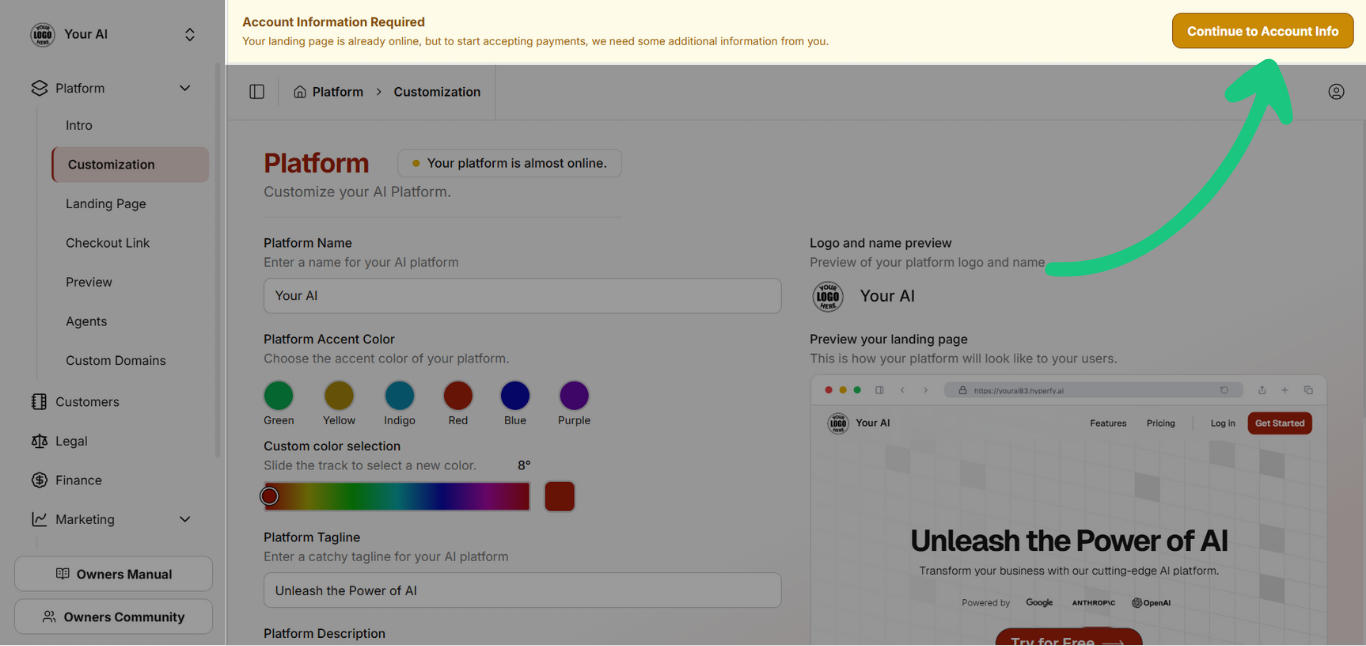
- In your dashboard, you’ll see a yellow notice asking you to finish your account information. Complete that once; your platform is ready to receive payments.
→ At this point, your platform is ready.
Confirm & personalize (recommended before you announce)
Do a quick pass to make sure the basics match your brand and audience:
- Identity (Settings → Customization)
Platform name, logo, accent color, short tagline (1 sentence), and description (1–2 lines).
- Domain
Use a Hyperfy subdomain (e.g., yourbrand.hyperfy.ai) or connect a custom domain (e.g., ai.yourbrand.com).
Note: Once chosen, the subdomain can’t be changed; to change later, add a custom domain or start a new account.
- Landing & checkout
Confirm both links work (landing + subscription checkout).
Update CTAs and copy so they speak directly to your niche and outcomes.
- Your two key links
- Landing page — information + free-trial CTA
- Checkout link — goes straight to sign-up (starts the 14-day free trial)
Prefer your own website? Use your own landing page and point the main CTA to your checkout link.
Ready when: the landing loads, checkout works, and your value is clear within 10 seconds.
Clear Offer (What You Sell and to Whom)
- One-liner: who you help, with what, and the result
- Audience defined: primary niche (e.g., real estate, e-commerce, consulting)
- Price: Each user pays the default $35/month (or a custom price you set) and receives full platform access, including unlimited text agents and 100 daily image credits, backed by a 14-day money-back guarantee.
Ready when: someone in your audience reads the first fold and thinks, “this is for me.”
Agents Ready to Use (The Heart of Your Platform)
Prepare 3 to 6 useful agents before launch.
For each agent, complete:
- Title (benefit-focused)
- Short description (what it does in 1 line)
- Model: choose GPT / Claude / Gemini (per task)
- Context (Description): up to 2,000 characters — be specific about tone, steps, boundaries, and output format
- Inputs: accept text, images, and documents (PDF, TXT, screenshots) as needed
- Visibility: public / private / exclusive
- Examples: 1–2 input → output pairs to guide users
Agent quality checklist
Ready when: someone in your niche can use the agent without asking for help.
End-to-End Test (10-Minute Dry Run)
- In your admin, click Preview to open your live platform as a user would see it.
(Optional: also open an incognito window with your landing link to check public view.)
- Run 3 quick tests inside Preview:
- One agent with text-only input
- One agent with a document upload (PDF) or an image/screenshot
- Generate an image in the studio (spend a credit)
- Confirm checkout and subscription links load and function (no need to create a new account—just verify the flow and error-free pages).
Ready when: you complete the flow without friction and everything behaves as expected at each step. If you encounter any issue or error, contact Hyperfy and we’ll help you resolve it.
Niche Polish (Nice-to-Have, Boosts Conversions)
- Create niche agents that solve specific problems you know well; publish them for your customers
- Tune landing copy to your niche’s language and outcomes
- Align visuals: logo and color accents that match your market
- Install tracking: GTM container, Google Ads conversions, Meta Pixel, TikTok Pixel
Go-to-Market Links & How to Promote
- You have two links ready to use:
- Landing page — education + trial CTA
- Checkout link — direct to sign-up (starts the 14-day free trial)
- Prefer your own website? Use your own landing page and set the main CTA to your checkout link.
- Ready to advertise? With tracking installed (GTM, Google Ads, Meta, TikTok), you can run campaigns and measure performance from day one.
- Invite 3–10 early users (current clients or partners), collect feedback, and refine agents. Clone what works into 1–2 more agents.